SnapAction.
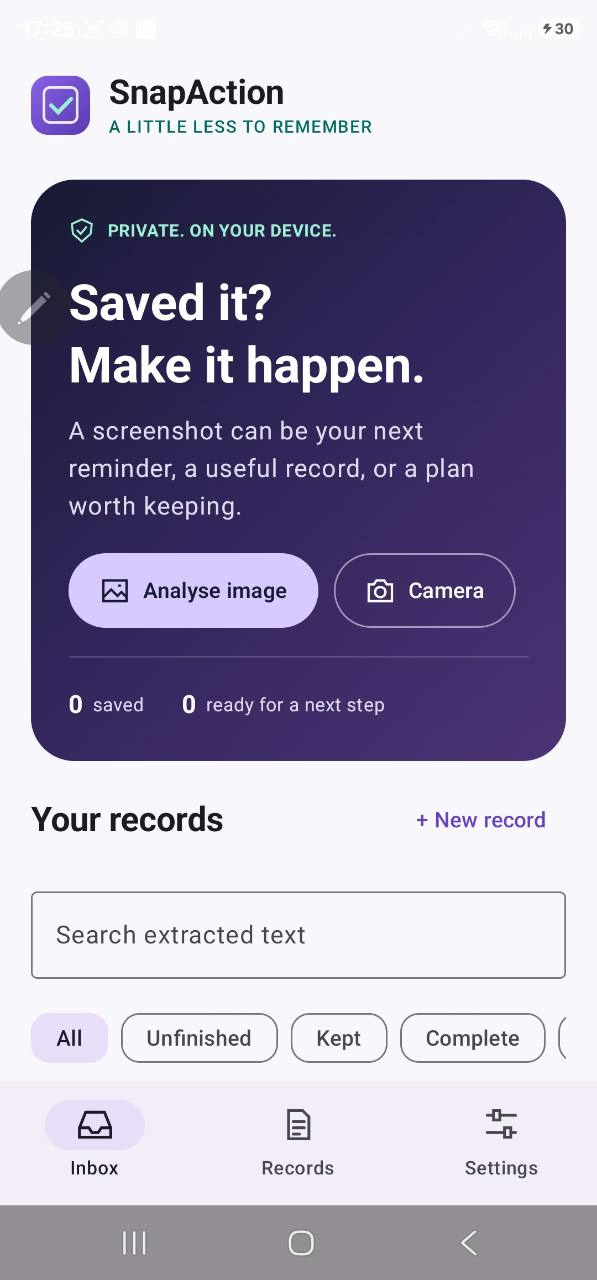
Turn the information inside screenshots and photographs into useful text, reminders and actions. Process images on your device.
View on Google Play
- PLATFORM
- Android
- STATUS
- Published on Google Play
- PRODUCT MODEL
- Free download with advertising and in-app purchases.
- CONTENT VERIFIED
- 15 October 2026
A reason to build.
Useful dates, addresses and details get buried in your camera roll. An image should be a starting point, not a dead end.
An interface with purpose.
Extract text locally, review the result and prepare a calendar entry, contact or navigation action in your chosen app.
What you can use.
- On-device text recognition
- Calendar, contact and navigation actions
- Searchable saved records
- Notes, checklists and price comparisons
Decisions that matter.
Review before acting. The interface keeps the user in control of extracted details and the destination app.
This case study describes the publicly available product. It does not infer an unpublished technology stack or internal architecture.
Turn a screenshot into a useful next step
Extract information from an image and review it before sending it to the app you choose.
What can I do with recognised text?
Copy or share the text, prepare a calendar entry, contact or navigation action, or save useful information to find later. Available actions depend on your image and device.
Where does recognition happen?
Image recognition happens on your device and does not require a SnapAction account. Ads, Play purchases and other apps you choose to open may use the internet.
Should I check the result?
Yes. Recognition can make mistakes, so review important dates, prices, addresses and destinations before confirming an action.
Product information and artwork: official Google Play listing. Public content and availability can change.
Something in mind?
Let’s make it real.
A website. An app. A launch. A whole new digital direction.
Tell me what you have in mind. It starts with a conversation.